
Getting Started
How to Withdraw Crypto from OKX Safely: Networks, Fees and Address Checks
A practical guide to withdrawing crypto from OKX safely: choose the right route, match the receiving network, verify addresses and tags, check fees, and troubleshoot delays.
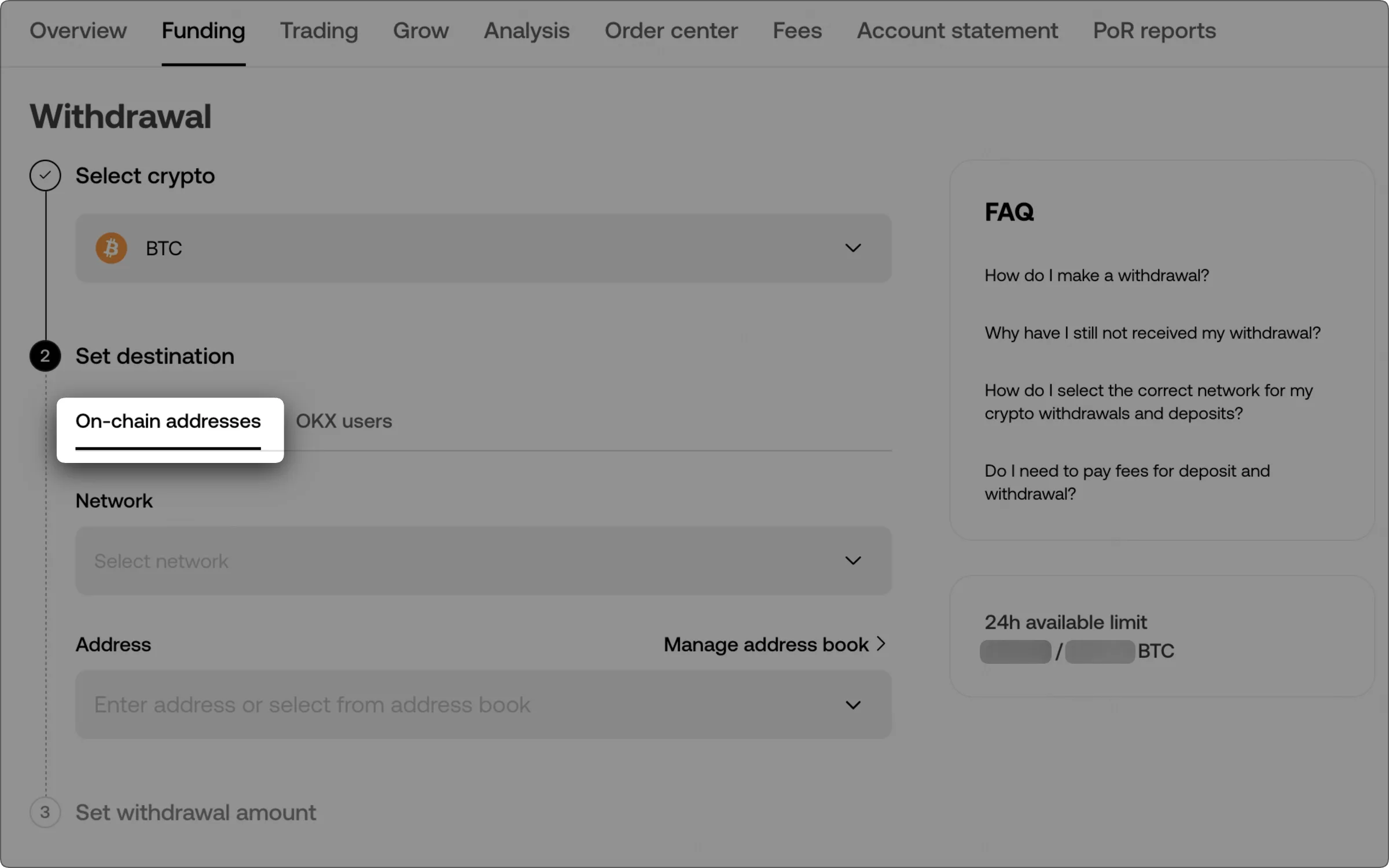
Official OKX web withdrawal interface showing the on-chain route. The example image contains no personal account details. Source: OKX Help Center, checked 12 August 2026.
Withdrawing crypto from OKX safely is less about clicking the right button than making four pieces of information agree: the asset, the destination, the blockchain network and any required tag or memo. A transfer can be valid on-chain and still fail to reach the balance you expected if one of those details is wrong.
This guide focuses on crypto withdrawals to another exchange or a self-custody wallet. It does not cover selling crypto for cash and withdrawing fiat to a bank. Menu labels, supported assets, fees, minimums and security checks can vary by region and change over time, so the live withdrawal screen inside your own OKX account is the final source of truth.
Before you start: know where the funds are going
Do not begin with the OKX withdrawal form. Begin at the receiving wallet or exchange.
- Identify the destination product. An exchange deposit address and a self-custody wallet address may look similar, but the responsibility model is different. If the distinction is unclear, read OKX Web3 Wallet vs exchange account first.
- Open the destination's receive or deposit page. Select the exact asset you intend to send.
- Record the networks the destination supports. Do not assume that support for an asset means support for every blockchain that carries it.
- Copy the destination address and any memo, tag or comment shown. Some custodial platforms need both to credit the correct account.
- Check the destination's minimum deposit and confirmation requirements. The amount that arrives after the withdrawal fee must satisfy the receiving platform's current rules.
If you are still learning where balances and transfer tools live in the interface, the beginner's tour of the OKX app is a useful orientation before moving real funds.
Choose the right withdrawal route
OKX may offer more than one way to move crypto. The relevant choices depend on the asset, destination and region.
On-chain withdrawal
Use an on-chain withdrawal when you are sending to an external wallet address or another exchange through a blockchain. The transaction will have a network, may incur a withdrawal fee and can be tracked with a transaction ID after it is broadcast.
Transfer to another OKX user
Where available, OKX also offers an internal transfer route for sending to another OKX user. OKX's current help material describes this route as instant and without a blockchain network fee, but availability and the identifying details required can differ by region. Select it only when the recipient has confirmed that they want an internal OKX transfer.
Do not choose an internal route merely because it looks cheaper, and do not choose an on-chain route without a destination address from the receiving side.
How to make an on-chain withdrawal safely
1. Open Withdraw from the official app or website
Sign in through the official OKX app or a trusted bookmark, then open Assets and Withdraw. Depending on your regional interface, the next option may be labelled Withdraw crypto, On-chain or Exchanges or wallets.
Avoid opening the withdrawal page from a link in an unsolicited email, advertisement or direct message. If the screen or domain looks unusual, stop and navigate again from the official app or site.
2. Select the exact asset
Choose the same asset that is selected on the destination's receive page. Similar names, tickers or wrapped versions do not make two assets interchangeable. If a token contract is displayed, use it as an additional check rather than relying only on the symbol.
3. Paste the destination address
Copy the address from the receiving wallet or exchange and paste it into OKX. Do not type a long address by hand. After pasting, compare characters at both the beginning and end with the source.
This check matters even when you used copy and paste. Clipboard-replacing malware and a copied address from the wrong account can both produce a well-formatted but unintended destination. If the destination wallet supports a readable name, verify the resolved address too; a familiar name is not a substitute for checking where it points.
4. Match the blockchain network at both ends
The withdrawal network on OKX must match the deposit or receiving network selected at the destination. The safest order is:
- See which networks the destination currently accepts for the asset.
- See which of those same networks OKX currently offers for withdrawal.
- Select a network present on both sides.
- Only then compare the displayed fee, minimum and estimated conditions.
A lower fee is not a reason to use a network the destination does not support. OKX may automatically recognise some address formats, but an automatic suggestion should still be checked against the receiving platform's deposit page. When multiple networks share compatible-looking address formats, the address alone may not reveal the correct route.
5. Enter the memo or tag when the destination requires one
Some assets and custodial destinations use an extra identifier—often called a memo, tag or comment—alongside the blockchain address. The address may lead to a platform-controlled wallet while the extra identifier tells the platform which customer to credit.
Use a simple rule:
- If the receiving page shows a memo, tag or comment, copy it exactly into the matching OKX field.
- If the receiving page does not show one, do not invent or reuse one.
- If the destination says one is required but OKX does not provide a field, stop and ask official support before sending.
- If the recipient sent the details in chat, verify them through a second trusted channel before a meaningful transfer.
OKX's official withdrawal guidance specifically warns that assets such as XRP may require a tag and that both the address and tag must be correct. Requirements can differ by asset and destination, so use the live receiving page rather than an example copied from a tutorial.
6. Enter the amount and read the fee preview
Enter the withdrawal amount, then review all figures shown before confirmation:
- the amount leaving your OKX balance;
- the withdrawal or network fee;
- the estimated amount the recipient will receive;
- OKX's current minimum withdrawal; and
- the destination's current minimum deposit, if it has one.
Fees and minimums can change with the asset, network and market conditions. This article deliberately does not publish a fixed fee table because a number copied today can make a future withdrawal decision worse. The live confirmation screen is the relevant quote for your transaction.
When several compatible networks are available, compare the total result—not only the headline fee. The receiving platform must support the chosen network, and the net arrival must remain above its minimum.
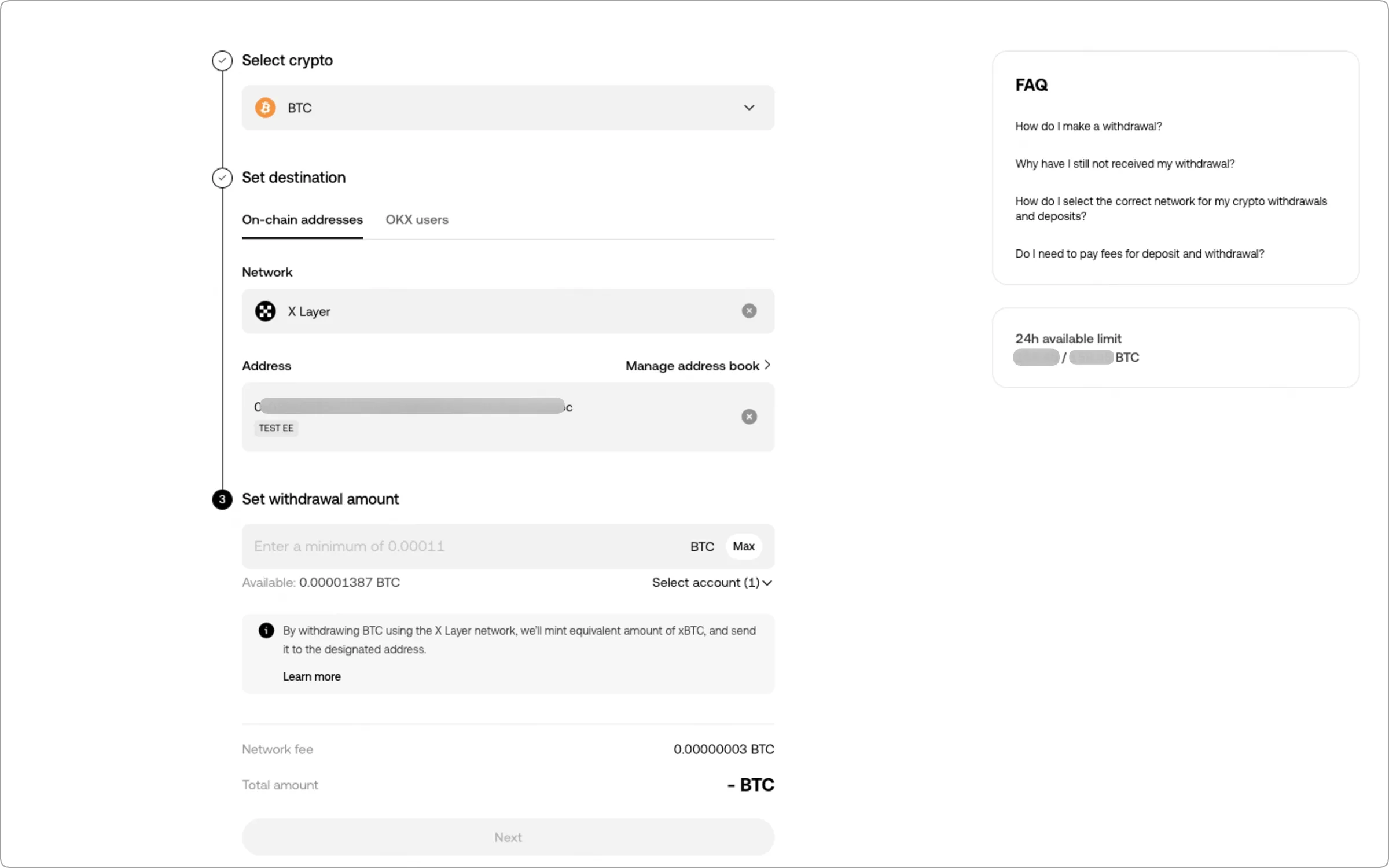
The live withdrawal form is where you verify the network, address, amount and fee. The address and account limits in this official example are masked. Source: OKX Help Center, checked 12 August 2026.
7. Consider a small test withdrawal
For a new address or a meaningful amount, a small test transfer can limit the impact of a mistake. It is most useful when the network fee and both platforms' minimums make a test practical.
A successful test is evidence that the route worked once; it is not permission to skip the checks on the second transfer. Copy or select the same verified destination, recheck the network and tag, and confirm that no account detail changed.
8. Review every field and complete security checks
Before submitting, compare the final screen with the destination page:
- asset;
- destination type;
- blockchain network;
- full address, not just a saved nickname;
- memo, tag or comment where required;
- withdrawal amount;
- fee and net arrival.
Complete the authentication steps shown by OKX, which may include two-factor verification. Never give a one-time code, password, private key or seed phrase to someone offering to “help” with a withdrawal. Official exchange support does not need the seed phrase for your self-custody wallet.
Use the address book as a safety control
For destinations you use repeatedly, saving a verified address reduces repeated copy-and-paste risk. OKX also offers an allowlist setting that restricts withdrawals to addresses stored in the address book. Its current documentation says an optional new-address withdrawal lock can prevent withdrawals to newly added allowlist addresses for 24 hours.
That friction is intentional: an attacker who gains account access should not be able to add a fresh address and immediately drain the account. The trade-off is that you must plan before sending to a genuinely new destination. For setup details and limitations, see the OKX withdrawal allowlist guide.
A saved label is not proof that you still control the destination. Periodically remove addresses you no longer use, and verify the full address and network before every meaningful transfer.
What happens after you submit
A crypto withdrawal passes through two systems: OKX first reviews and sends it, then the blockchain and receiving platform process it. A delay can occur at any stage.
Keep the withdrawal record and transaction ID, often called a TxID or transaction hash. Use them to separate three different situations:
The withdrawal is still pending on OKX
If OKX has not yet broadcast the transaction, there may be no TxID. Check the status and any notices in withdrawal history. Security review, account restrictions or a queue can delay submission. Follow the instructions shown in your account and contact official OKX support if the status remains abnormal.
The transaction is on-chain but not sufficiently confirmed
Open the TxID on an explorer for the selected network. A transaction can be visible but still waiting for blocks or confirmations. The receiving exchange may require more confirmations than the blockchain needs merely to include the transaction.
The transaction is confirmed but the destination has not credited it
Compare the asset, network, destination address, memo or tag and amount against the receiving platform's deposit requirements. If the blockchain shows the transfer at the intended destination but the balance is absent, contact the receiving platform and provide the TxID and transaction details. OKX's official troubleshooting guidance likewise directs users to the receiving platform once the transfer is confirmed on-chain but not credited.
Do not send a second transfer to “unstick” the first one. It creates another independent transaction and can double the amount at risk.
If you used the wrong address, network or tag
Treat the problem as an evidence-gathering task:
- Save the withdrawal record, TxID, asset, network, amount and time.
- Capture the destination details you intended to use.
- Determine who controls the address that actually received the transaction.
- Contact the official support channel of the relevant platform.
A completed blockchain transfer generally cannot be reversed by OKX. Recovery may be impossible, and when a custodial platform can investigate, it may require additional verification or fees. Do not trust anyone who promises guaranteed recovery, asks for a seed phrase or private key, or requests an advance payment through a private message.
A 30-second withdrawal checklist
Before selecting Confirm, answer yes to each line:
- I obtained the address from the destination's current receive or deposit page.
- The asset is the same at both ends.
- The selected blockchain network is supported at both ends.
- The pasted address matches the source after visual comparison.
- I entered the exact memo, tag or comment if the destination requires one.
- The net arrival is above the destination's current minimum.
- I reviewed the fee shown for this transaction.
- I considered a test transfer for a new destination or meaningful amount.
- I know where to retrieve the withdrawal record and TxID.
- No one is pressuring me to rush, bypass security or share credentials.
The safest withdrawal is deliberately uneventful: start at the destination, match the network, verify every field, read the live fee preview and keep the transaction evidence.
Sources and scope
This guide was rechecked against the following official OKX help pages on 12 August 2026:
- How do I make a withdrawal? (web)
- How do I make a crypto withdrawal? (app)
- How do I enable allowlist?
- What should I do if the other platform didn't receive my withdrawal?
- Do I need to pay fees for deposit and withdrawal?
Product availability, menu labels, limits and security rules can vary by jurisdiction and change over time. Follow the notices inside your own account. This article is educational and does not provide investment, legal or tax advice.