
Getting Started
OKX Demo Limit Order Still Open? How to Check, Cancel and Free Virtual Balance
An OKX demo limit order can stay open or fill only partly. Learn where to check its status, cancel the remaining quantity, and understand why virtual funds or Reset may be unavailable.
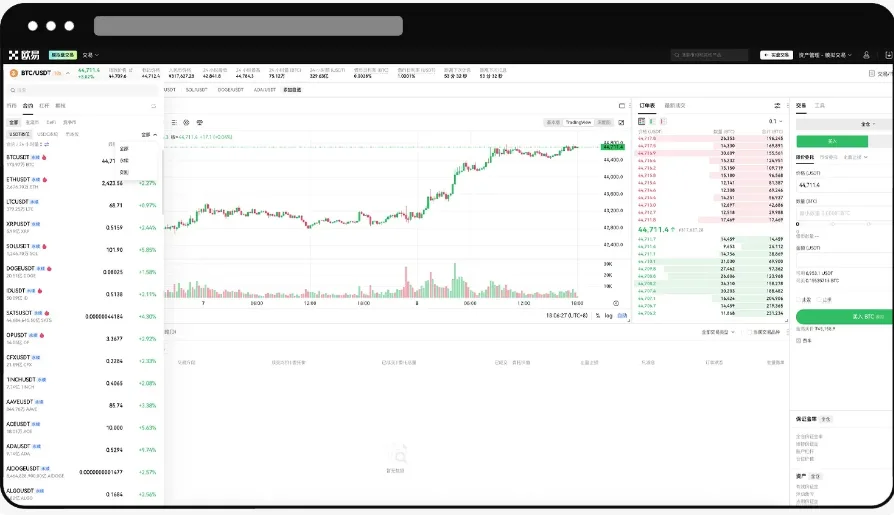
An OKX demo limit order can remain open even after you press Buy or Sell. That usually means the order was submitted but has not found enough matching interest at your price. Before trying the order again, check its status and the amount already filled. A second order can create a second position if the first one later executes.
The image is a real interface illustration from OKX's demo trading help page, captured October 7, 2026. It shows where the order area sits; it does not show a pending order. The illustrated language and layout may differ from your account.
First, confirm you are in demo mode
On the web, OKX's instructions start at Trade → Demo trading. Look for the demo label and virtual assets before checking or placing an order. The demo balance has no cash value and is separate from live funds. If you need a wider walkthrough of the practice environment, start with our OKX demo trading guide.
Check the market and product shown beside the order ticket. A BTC spot order and a BTC perpetual order are different instructions, even if both are placed in demo mode. Open orders can also be filtered to the current market, so widen the filter if the order you expect is missing.
Find out whether the order is waiting or partly filled
Open Open orders on the trading screen or the orders area in the app. Locate the order by market, side, price and time; then read its status, original quantity, filled quantity and remaining quantity. Menu labels can vary by product and region, so rely on the order details rather than a remembered tab location.
- No quantity filled: the order is waiting at its limit price, unless an additional order instruction causes it to expire or cancel.
- Some quantity filled: the remaining portion can still be open. Cancelling it will not undo the completed fill.
- Fully filled or cancelled: there is no open remainder to cancel. Check order history and, for derivatives, the position list to understand the result.
A limit price controls the worst price you accept; it does not guarantee a fill. OKX explains that an order can wait when the price cannot be matched, and a partial fill can occur when there is insufficient quantity on the other side. Seeing a chart touch your chosen price does not prove your whole order was executed. Read the official limit-order explanation for the matching and partial-fill rules.
Cancel the unfilled remainder if you no longer want it
Select the order in Open orders, review its market and remaining quantity, then choose Cancel. Refresh the order list and verify that the open remainder has disappeared or is marked cancelled. OKX says cancelling an unfilled limit order releases the amount reserved for that portion; in a demo account, check the available virtual balance after the status updates. If the balance still looks wrong, confirm that another order has not reserved it. OKX's open-order balance explanation describes why available funds can be lower than the total balance.
If part of the order filled, cancellation only stops the unfilled part. A spot fill leaves the acquired asset; a futures fill may leave an open position. Do not use Reset as a substitute for reviewing either one. If you used futures and are unsure what collateral the resulting position can use, read our cross versus isolated margin guide before changing margin settings.
Why Reset may still be unavailable
OKX says a demo asset reset requires no pending demo orders and no open demo positions. After cancelling the order, inspect the positions area separately and close any position you intentionally want to end. Then follow the current demo asset path shown in your account. OKX's web instructions describe Assets → Demo trading → My assets → Reset for the relevant asset. Reset restores the initial virtual amount; it does not change your live balance or let you pick an arbitrary starting amount. See OKX's current demo reset instructions.
If an expected order is absent, check the selected market, product, filters and order history before placing a replacement. If the page itself fails to show assets or orders, reload it and use OKX support if the problem persists. Keep a screenshot of the order status for support, but hide account details before sharing it.
Quick check: verify Demo trading → find the order → compare filled and remaining quantities → cancel only the unwanted remainder → inspect any position → confirm the virtual balance and reset eligibility. A practice order is most useful when you can explain its final status, not merely when the chart moves in your direction.
Sources checked October 7, 2026: OKX's demo trading, demo asset reset, limit order and open order help pages linked above. Features and labels vary by account and region. This guide is educational and does not recommend a trade or strategy.