
Copy Trading & Bots
OKX Copy Trading: Fixed vs Proportional Amount for Each Order
Learn how fixed and proportional OKX copy-order amounts differ, how several orders affect total exposure, and what to check before confirming Spot or Futures copies.
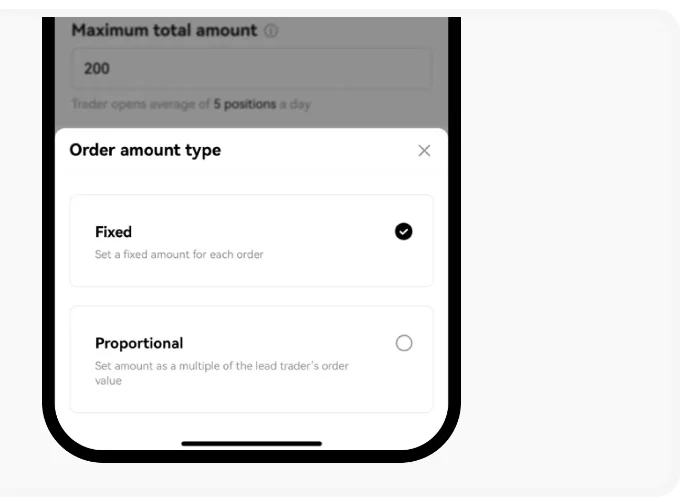
An OKX copy trade can use a fixed amount for every new order or a proportional amount based on the lead trader's order. The choice changes how quickly your exposure grows, especially when the trader opens several positions. Before selecting either mode, decide how much you can commit to one trader in total and check whether you are copying Spot or Futures.
The Fixed and Proportional menu appears in OKX's public copy-order guide, captured October 6, 2026. This is an official documentation example, not a live account or a recommended setting.
What changes between the two modes?
With fixed amount, you enter an amount for each copied order. In OKX's Futures guide, that number is the margin assigned to each order. In its Spot guide, it is the value invested in each copied buy. The same number can be used again when the leader places another eligible order; it is not a limit on your entire copy relationship.
With proportional amount, you choose a multiplier. OKX describes the resulting copy order value as the lead trader's order value multiplied by that number. If the lead order value is 500 USDT and your multiplier is 0.1, the calculated order value is 50 USDT. If the next lead order value is 2,000 USDT, the same multiplier produces 200 USDT. These are arithmetic examples, not expected trade sizes or returns. The actual order still depends on the product's minimums, available funds, limits and execution rules.
| Question | Fixed amount | Proportional amount |
|---|---|---|
| What do you enter? | An amount per copied order. | A multiplier applied to the leader's order value. |
| Does each order use the same planned size? | Generally yes, subject to product rules and execution. | No. It changes with the lead trader's order size. |
| What needs monitoring? | How many orders can be open at once. | Both the multiplier and changes in the leader's order sizes. |
Neither setting is a safety rating. A fixed amount can accumulate across many orders, while a proportional multiplier can follow a sudden jump in the leader's order size. For the wider decision about product choice and trader history, read our lead-trader review and risk-limit checklist.
Set a total cap separately from the order size
Maximum total amount is the separate cap for the capital assigned to one lead trader. OKX says that when it is reached, new copied trades stop until existing trades close or copied Spot assets are sold. For Spot, OKX counts funds in ongoing copied trades for this limit, rather than all historical trades. A per-order amount alone does not provide this cap.
Before confirming, consider a simple stress check: if the leader opens several eligible orders close together, how much would your chosen setting try to allocate? For fixed amount, multiply the per-order amount by the number of simultaneous orders you want to allow for. For proportional amount, use more than one plausible lead-order size, including a larger one, rather than relying only on the displayed average. Compare the result with the maximum total amount and your available trading balance. The calculation helps reveal exposure; it cannot predict the leader's next order.
Do not treat a rejected copy as a reason to raise your cap automatically. Our guide to copy orders that do not go through explains how to check the notice, minimum order value, balance and price protection first.
Why might a small setting still fail?
OKX says a copied Spot order can fail when its calculated value is below the market's current minimum. That can happen with either mode: a fixed amount may be too low, or a small multiplier applied to a small lead order may produce too little. The minimum varies by asset and may change with price, so check the current trading screen rather than copying a number from an old example. Insufficient trading-account funds and a reached maximum total amount are separate failure reasons.
The platform also applies other conditions, including price protection for Spot copied buys. Increasing the amount will not necessarily solve a rejection caused by price movement or a restriction on the lead trader. OKX says a Spot order that already failed is not placed automatically after you add funds. Review the order history before assuming you have a position.
Spot and Futures need different risk checks
For a Spot copy, the amount buys the underlying asset. You can lose value if that asset falls, even without leverage. For a Futures copy, the fixed amount described in OKX's guide is margin, while the position can have a larger market exposure when leverage is used. A proportional Futures order also requires you to inspect the contract, leverage and margin mode shown in the confirmation flow. Equal looking amount fields do not imply equal loss risk.
If the difference between holding an asset and holding a leveraged contract is unclear, review Spot versus Futures copy trading on OKX before setting an order amount. A total stop loss, where available, is another control to review, but it does not guarantee an exact exit price or erase the risk in open positions.
A practical check before you confirm
- Open the lead trader's profile and identify whether you are copying Spot or Futures. Product availability and menu labels can vary by region and account.
- On the copy settings screen, read the amount type: Fixed or Proportional. For proportional sizing, write down what the multiplier would do to a small and a larger lead order.
- Set and review the maximum total amount separately. Check available funds and any product minimum shown in the current interface.
- If copying Futures, inspect contract selection, leverage, margin mode and any total stop-loss or per-order controls. Understand what each control can and cannot limit.
- Read the final order summary before confirming. Later, compare the actual copied orders and open positions with the settings you expected.
If the minimum order size needed to participate exceeds the amount you are comfortable risking, skipping that copy is a valid choice. The aim is to understand the size of each possible order and the combined exposure before you delegate execution.
Official sources checked October 6, 2026: OKX copy-order guide, OKX Spot copy-trading settings, OKX proportional-order explanation, and OKX Spot order-failure reasons. Features, limits and eligibility can change. This guide is educational and does not recommend a trader or investment amount.