
Web3 Wallet & Tools
OKX Demo Trading API: x-simulated-trading, Keys and Common Errors
Set up the OKX demo trading API without mixing live and simulated credentials. Learn the required header, regional endpoints, common error codes and a safe test sequence.
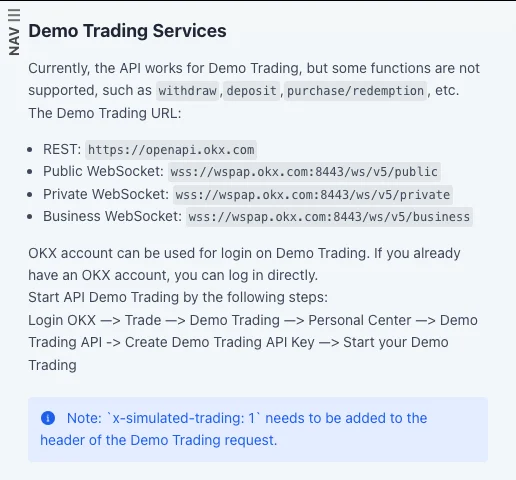
The OKX demo trading API lets you test signed requests and order workflows with simulated assets. The essential rule is simple: create a key inside Demo Trading, keep it separate from every live key, and add x-simulated-trading: 1 to each demo REST request. A demo environment can show whether your integration authenticates and handles orders correctly; it cannot prove that a strategy will fill or profit the same way in live markets.
If you are still learning the trading interface rather than building an integration, start with the web/app demo setup, first order and balance reset guide. This guide is specifically for developers and technically minded users who need to connect to the API without accidentally crossing the demo/live boundary.
Screenshot of the public OKX API documentation captured September 10, 2026. It contains no account details or credentials. Regional endpoints and product availability can differ.
Quick setup: the five-step version
- Sign in to OKX and switch to Trade → Demo Trading.
- Open Personal Center → Demo Trading API and create a demo API key.
- Grant only the permissions your test needs. Do not reuse or copy a live key.
- Use the REST and WebSocket addresses shown in the API documentation for your OKX region.
- Add
x-simulated-trading: 1to every demo REST request, then begin with a read-only authenticated call before testing an order.
The navigation wording may change by region, but the current global API guide documents that path. If your account shows a different host or menu, follow the documentation served for your jurisdiction instead of substituting an endpoint from a tutorial.
Keep demo and live credentials separate
The safest setup makes it difficult for code to cross environments by mistake. Use separate configuration files or secret-store entries, distinct variable names and an obvious runtime label. Never let a single toggle silently reuse one key in both environments.
| Setting | Demo trading | Live trading |
|---|---|---|
| API key | Created under Demo Trading API | Created under the live account API settings |
| REST marker | x-simulated-trading: 1 |
Do not send the demo value |
| WebSocket host | Demo host such as wspap.okx.com |
Production host such as ws.okx.com |
| Assets | Simulated | Real |
| Deposit/withdrawal tests | Unsupported | Real asset movement; do not use for a connectivity test |
Before creating any credential, read the OKX API key security guide. A practical minimum is one key per integration, the narrowest permissions possible and an IP allowlist when your deployment has a stable outbound address. Never paste a key, secret or passphrase into source code, screenshots, issue trackers or chat.
Which endpoints should you use?
OKX publishes region-specific service addresses. In the global documentation checked for this article, Demo Trading uses:
- REST:
https://openapi.okx.com - Public WebSocket:
wss://wspap.okx.com:8443/ws/v5/public - Private WebSocket:
wss://wspap.okx.com:8443/ws/v5/private - Business WebSocket:
wss://wspap.okx.com:8443/ws/v5/business
The US documentation uses different hosts, including https://us.okx.com for REST and wsuspap.okx.com for demo WebSockets. This is why copying a host from another region is fragile. Start from the API guide linked by your own OKX account and keep the REST host, WebSocket host and API key in the same regional environment.
The public, private and business WebSocket paths serve different channel groups. Select the path specified on the documentation page for the channel you need; do not assume every subscription belongs on public.
The required x-simulated-trading header
For a demo REST request, OKX requires this additional header:
Content-Type: application/json
x-simulated-trading: 1
Authenticated calls still require the normal OKX authentication headers and a valid signature. The demo header does not replace authentication; it tells OKX which environment the request belongs to. Generate the timestamp and signature at runtime, and keep all credential values out of logs.
A safe first test is an authenticated read request that does not place or cancel anything. Confirm all of the following before allowing an order call:
- the application banner or log explicitly says
DEMO; - the configured key is the demo key;
- the regional REST host matches that key;
x-simulated-tradingis exactly1;- the response shows simulated balances rather than a live-account state.
Only after that check should you place a deliberately small simulated order, retrieve its status and cancel or close it. The objective is to verify the full request lifecycle—not to maximise virtual P&L.
Three common errors and what they mean
Error 50101: APIKey does not match the current environment
OKX's API FAQ attributes this error to an environment mismatch. Typical causes are a live key sent with the demo header or a demo key sent as a live request. Separately check the regional host; OKX also documents regional-domain mismatch under error 50119. Check the key source, host and x-simulated-trading value together; changing only one may leave the configuration inconsistent.
Error 50102: Timestamp request expired
Signed requests depend on time. OKX advises synchronising your machine with its server time and keeping the difference within the documented tolerance. Use automatic system time, generate a fresh timestamp immediately before signing, and avoid retrying an old signed payload after a long queue or network delay. Do not solve this by hard-coding a timestamp.
Error 51010: Request unsupported under current account mode
Some order operations require a compatible trading account mode. OKX says the first account-mode selection must be completed on the web or app. If this error appears, verify the intended product and current mode before changing code. The OKX account modes explainer covers the difference between Spot, Futures, Multi-currency margin and Portfolio margin modes.
Treat an API error as a specific configuration signal. Record the error code and request ID, but never log request signatures, secrets, passphrases or full authentication headers.
What the demo API does not support
The official API guide states that some functions are unavailable in Demo Trading, including:
- deposits;
- withdrawals;
- purchase or redemption functions.
Do not interpret those failures as proof that your transfer or Earn integration is correctly implemented. Those code paths need separate validation with documentation, mocks and controlled review; a demo order environment is not a simulated blockchain or a complete replica of every account service.
What a successful demo test actually proves
A useful demo run can verify that your software:
- selects the intended environment;
- builds and signs requests correctly;
- connects to the documented WebSocket service;
- submits, reads, amends and cancels supported simulated orders;
- handles rejected requests and order-state changes;
- prevents secrets from appearing in logs.
It does not prove live profitability, execution quality or resilience under real market stress. OKX's current demo help page says demo and live trading are separate and that demo price movements should not be used as a reference for live conditions. Real fills can differ because liquidity, latency, volatility and market impact differ.
A conservative demo-to-live gate
Do not switch an integration to live merely because one order succeeded. Require a written checklist:
- Environment selection fails closed: an unknown value stops the program.
- Demo and live credentials are stored separately.
- Order size and price have hard limits independent of strategy output.
- The program handles timeouts without blindly resubmitting an order.
- Every order has an idempotency or reconciliation plan appropriate to the endpoint.
- Logs contain request IDs and outcomes, but no credentials or signatures.
- A human can disable the integration and revoke its key quickly.
- The first live test, if undertaken, uses an amount whose total loss would not affect essential expenses.
Demo trading is most valuable as an operational rehearsal. Use it to prove that the plumbing, controls and failure handling work; keep claims about market performance out of the conclusion.
Official sources checked
- OKX API guide: Demo Trading Services, checked September 27, 2026.
- OKX API FAQ, checked September 27, 2026.
- What's demo trading and how do I use it?, updated September 4, 2026 and checked September 27, 2026.
Educational content only. APIs can place trades when granted trading permission. Crypto and leveraged trading involve substantial risk of loss. OKAVG is an independent tutorial site and is not affiliated with OKX.